At the close of business the daily reads need to be taken. However if you wish to check your takings during the day, you may use the X-VIEW DAY function. An X read can be done at any time during the day as many times as you wish. It also allows you to view your takings without actually printing anything off.
NB.Z read is for the end of the day only. If a z-read is done part way through the day, all totals will be reset.
To view / print an X-VIEW DAY report:
- Press MANAGER MENU
- Select TILL FUNCTION
You have 2 reports to choose from, Z–END OF DAY and X–VIEW DAY
- Press X–VIEW DAY.
The following dialog box will appear.
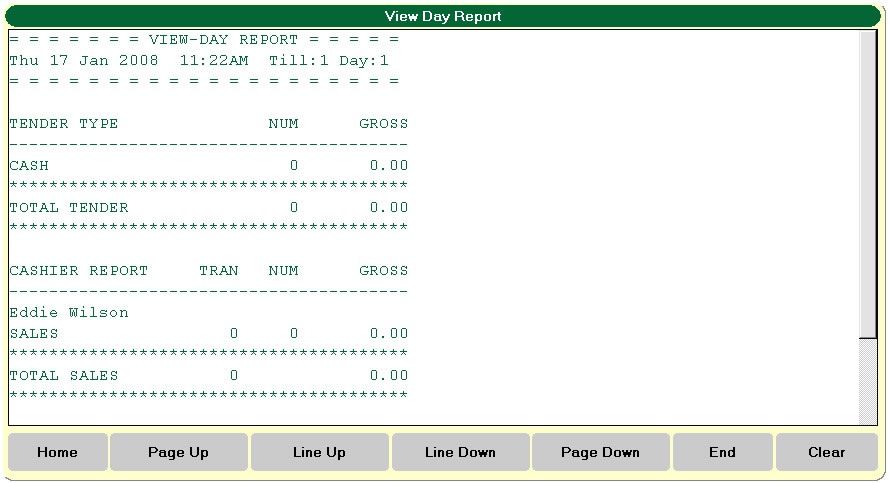
Use the Navigation buttons if necessary, to move down the screen. Press CLEAR to exit the window whereupon the till will prompt you ENTER to print the report or CLEAR to back to the sale screen.
N.B The X will only print a brief statement of the day’s takings so far. It will not give the full details found on the Z read.
To print a Z–END OF DAY
- Press MANAGER MENU
- Select TILL FUNCTION
- Select Z–END OF DAY.
The till will ask you for a password to confirm you want to do a Z read.
(Z- END OF DAY code/password 995599)
- Press enter
- Report prints.
The till software then closes down leaving you with the “DESKTOP” that is then ready to be restarted the following day. If for whatever reason a Z-END OF DAY read is done during the day accidentally or the till software exited leaving the blue “DESKTOP” screen double tap the icon marked PAYPOINT shown below would be done first thing in the morning.

This is a shortened example of a Z read from our shop in Kidderminster.
WEAVERS WHARF TEL 01562 752151 Mon 04 Jan 2009 05:33PM END OF DAY REPORT FOR DAY 637 TILL 1 NUM GROSS TENDER TYPE NUM GROSS CASHBACK SUMMARY NUM GROSS ********** DISCOUNT REASON GROSS RETURN REASON GROSS TIMEBAND REPORT CASHIER REPORT Category Qty Value ********** LAY-AWAY REPORT |
You will only need to reconcile these figures at the top with the daily banking. The rest is sales breakdown via time, user, product etc
Breakdown of card sales from OCIUS card machine
Your Net sales for the day
N.B If vouchers are taken during the day you will find that the total tender value differs from the other totals as no change is given from the voucher.
Average Transaction and Average items are displayed here after the time band report.
This will display any transaction s that have been put on hold not yet paid for. (See later notes for putting sales on hold). |