Overview
Ocius is a pre-accredited chip and PIN system which can run stand-alone or integrated into a Point of Sale (PoS). Ocius’s main function is to provide Chip & PIN card processing in a customer present, retail environment.
It consists of a pin-pad connected to the till, a software element running on the till, a secure internet connection managed by COMMIDEA who supply the software.
To Process a Sale
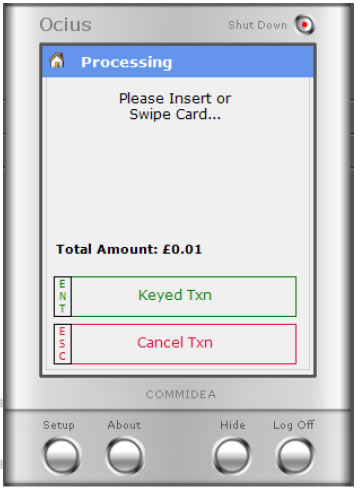
- Ring the sale through the till as normal. -The chip and pin screen appears on the desktop, ‘on-top’ of the till screen. The pin-pad shows a message which requests the customer to 'INSERT CARD' - Ask the customer to insert their card into the pin pad. |
 |
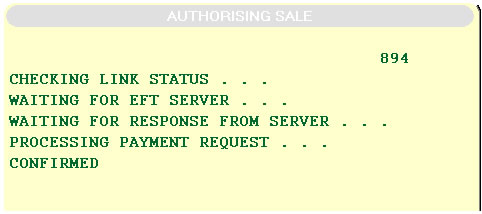 |
The PIN is verified by the pin-pad. The display on the till screen reflects the progress and shows that the PIN was verified and that the till is now contacting the bank to authorise the transaction. After a few seconds the transaction is authorised, the pin-pad shows a message requesting the customer to remove their card from the pin-pad. |
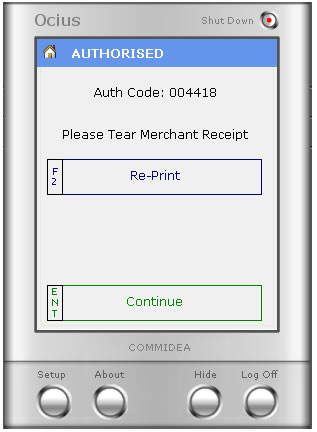 |
- Prompt the customer to remove their card from the pin-pad. The till displays the authorisation code on the till screen and that the transaction was successfully authorized. The till prints out two receipts. The first is the merchant copy and is retained in the till. If declined, the silver box minimises and returns control back to the Paypoint tender screen, ready for an alternative method of payment. |
Keyed Transactions
Note: a keyed transaction could expose the merchant to fraud liability should the transaction be subsequently rejected by the bank.
At the point where the CARD button on the till has been pressed, the pin-pad will ask the card holder to insert their card; the till operator will then have an option on screen to “key in” the details for the transaction. If a card does not have a CHIP and cannot be swiped, the till allows the card to be keyed. If the till operator presses ENTER before the card holder inserts their card into the pin-pad, the till will expect the card details to be keyed in, The card must then be verified by signature and a receipt will be printed with the relevant details and a signature box. If the bank is unavailable for any reason including communications failure, the transaction is likely to be ‘referred’. This means that the till operator will have the opportunity to force the transaction through by inserting an authorisation code they have acquired over the phone – the number to call is displayed on screen. |
|
Refunding Transactions
This is very simple, and there is no need for Supervisor cards etc.
Put the transaction through the till and refund as normal.
- Press Card and Enter
- The Till will ask for a manager’s pin. Press 9999 on the silver ‘on-screen’ keypad and press enter.
- The Till will prompt for the customer to insert or swipe their card.
- It will then prompt to Remove their card and hand to the Cashier.
At the same time a receipt will print with a box for the customers to sign.
This has to be checked so that the refund goes back to the card, the sale was taken from.
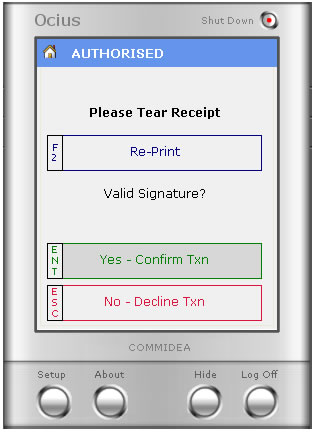 |
The till will ask if the signature matches. If it does, then press YES and complete the transaction. If the signature does not match then there is the option to decline the transaction. Under this circumstance, it would normally be due to the suspicion of a fraudulent card or signature being used. If this is the case, follow the code 10 procedure. |