An offline printing test is provided as a diagnostic tool to ensure the printer is operating correctly.
- Open the top cover.
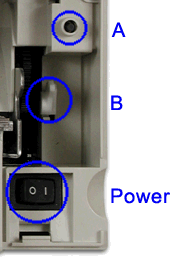
- Press and hold the paper feed button (A) for 5 seconds. Make sure you press the little black button under the cover not the one on the cover. The LED indicator will make one quick flash followed by a pause. The beeper will make a short single tone periodically.
- Release the paper feed button.
- Close the top cover.
- See Figure 34 on page 69 of the users guide and verify that your printer has printed correct information for your model and configuration:
- 2-MB card with user flash storage enabled
- RS-232, RS-485 or USB serial interface
- Applicable parameters for RS-232 communications:
- 9600 or 19 200 baud rate
- DTR/DSR or XON/XOFF control
- A solid line should appear as the last line of the test pattern. If any characters that appear in Figure 34 on page 69 of the users guide are missing from the test pattern you print, or if the solid line is missing, go to Table 4 on page 70 of the users guide.
|
|