Toshiba TEC ST-60 Till
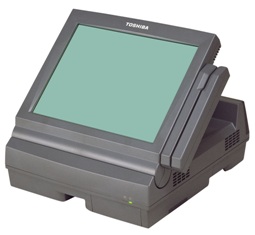
The TEC is a simple compact but sturdy machine with a 14" Touch Screen utilizing Analog Resistor Film technology this type of touch screen however is more liable to break.It's biggest faults are it's age and with that it's reliability which will further diminish over time.
 |
|
Located under the flap is the ON/OFF button. This is the black round button. There are also two USB slots for the keyboard to be plugged in. |
|
This is the under side of the TEC till where the cables for the other equipment connects to.
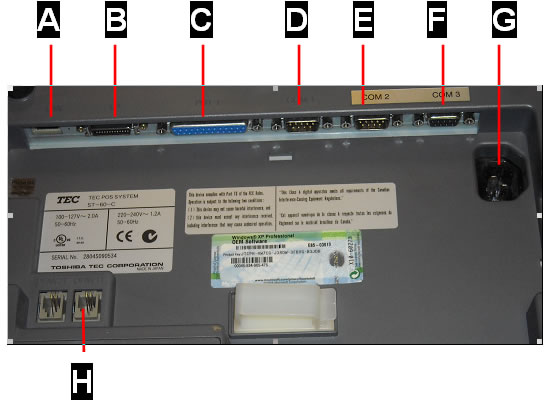
Reference |
Description |
A |
(LAN) This stands for Local Area Network. This is where the yellow cable that runs from the router to the till plugs into. |
B |
Analogue video – UNUSED. This is where an extra screen can be connected. |
C |
PRT1 – This is the connection for the receipt printer. This is where the large grey cable plugs into. |
D |
COM1 - UNUSED |
E |
COM2 – This is where the cable for the Ocius credit card machine is plugged into. |
F |
COM3 – This is where the black cable for the scanner is plugged into. |
G |
This is where the power cable plugs into. |
H |
DRW1T – This is the connection for the cash drawer. This is where the thin white cable plugs into. |