To swap a till over you need to change the till identity. This is in 3 places. The Paypoint Software, the Network settings and the PC Name. Then all you need are the promotional files and you're good to go.
Firstly we'll change the depot ID so the files go to the right till and the sales come back to the right account.
In the Paypoint software Press
Manager Menu,
Instore Functions,
System Settings,
Till Set Up. You will be asked for the passcode which is 559955
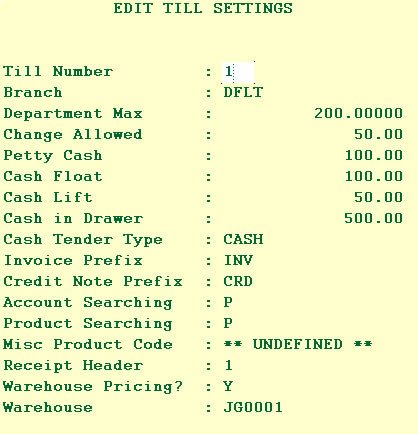
You will be presented with the screen above. Move down to the bottom option "Warehouse". Change the shop name to the right account No.
Next we need to change the Network settings. You can find this on the Network Page here.
Then you need to copy the text files over so the till has the till has the current prices and promotions, click here to see how.