The IBM Printer connects to the till via the comm port on the back of the printer to serial port 1 on the back of the till. The printer can get it's power from either it's own power supply or from the till via red power socket. Click here to see the diagram of the sockets and what they connect to.
Push the dip switch 3 down on the underside of the printer then switch printer back on.
Go to C:\JGV602 and open the “Printer_IBM” folder.
Double click on go.bat
It is easier to use a keyboard for the following
In the grey dos screen press OK
Put dot in RS-232 and also in 9600 in the Baud Rate on the right
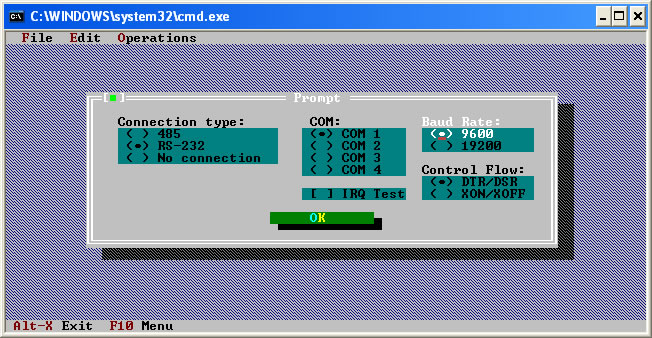
Press OK (this will then call the printer’s drivers)
Click on OPERATIONS
Click on DOWNLOAD LOGOS
On the grey box that appears click DOWNLOAD
Click YES
Once this has completed, press OK
Click CLOSE
Click FILE
Click EXIT
Click YES
Switch the printer off and put the dip switch 3 back up. Switch the printer back on.